
From the workshop to your computer
In my workshop in Dortmund, Germany, I have been repairing and building guitars, basses, pickups and amps since 2017 – and, always chasing that sound, effect pedals too. What fascinates me about pedals and vintage studio gear now lives in software as well: plugins for your DAW and Proberaum, an app for practising with your own sound.
Almost every plugin is modelled on a piece of music history: the artificial double tracking of the 60‘s, a legendary boutique modulation pedal, a 1978 string machine, the bucket-brigade chips of old effect units. And then there was the wish for something wild and unpredictable: Kaleidoskop rolls the dice on its own effect chains – from warm and spacious to rough and broken. You can try everything free for 14 days before you buy.
Jan · Ruhrpott Guitars
App
Proberaum
Practise with plugins and playback – the app for your home rehearsal room
€29
Plugin bundle
Complete bundle
How it works
Try first
Try everything free and fully featured for 14 days. After that it keeps running as a demo with short dropouts.
One license
Covers Mac and Windows together, on up to five computers at the same time. You can sign out a computer at any time.
Updates included
All version 1 updates are included in the price.
Upgrade
Whatever you already bought counts in full towards a bundle.
The app
Proberaum
Practise with plugins and playback – the app for your home rehearsal room
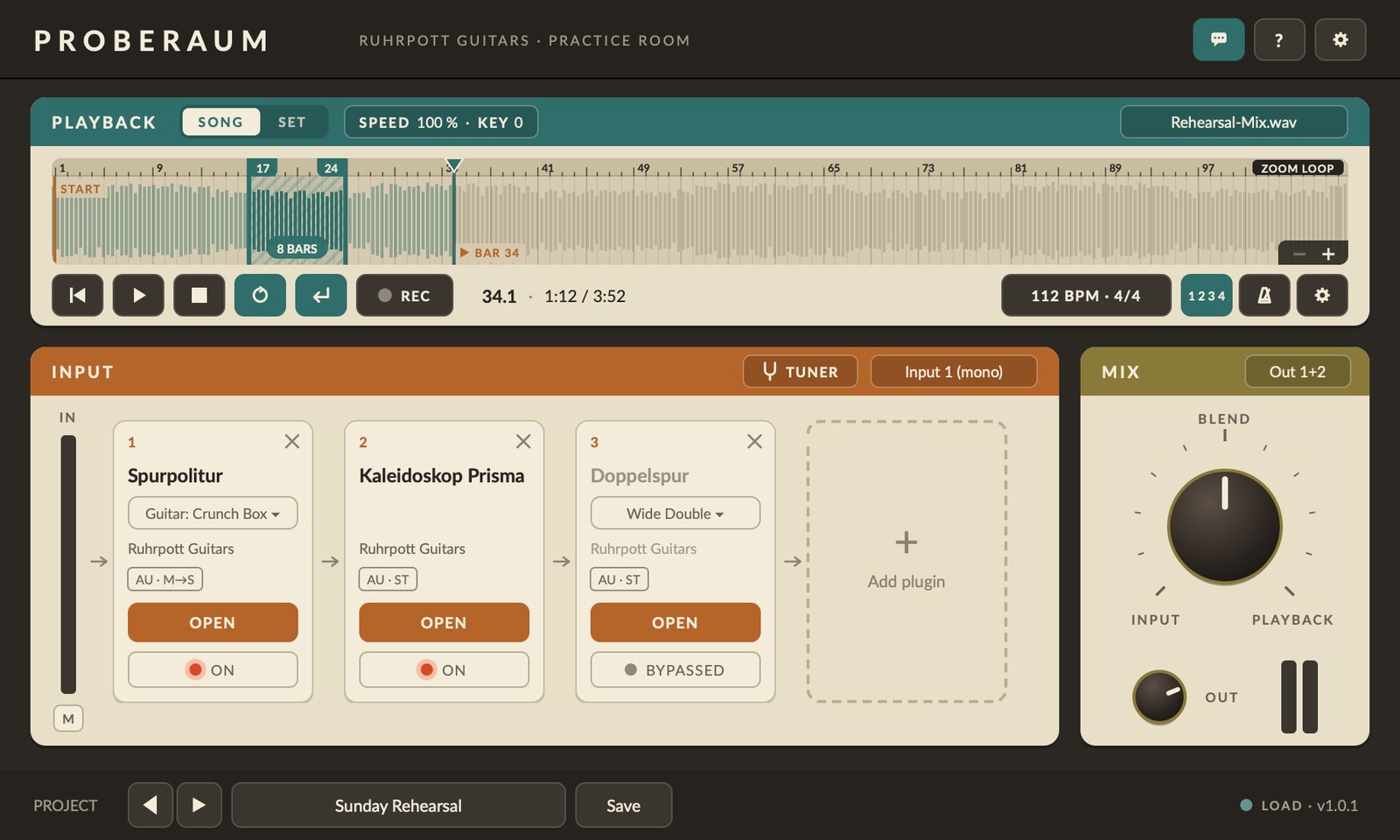
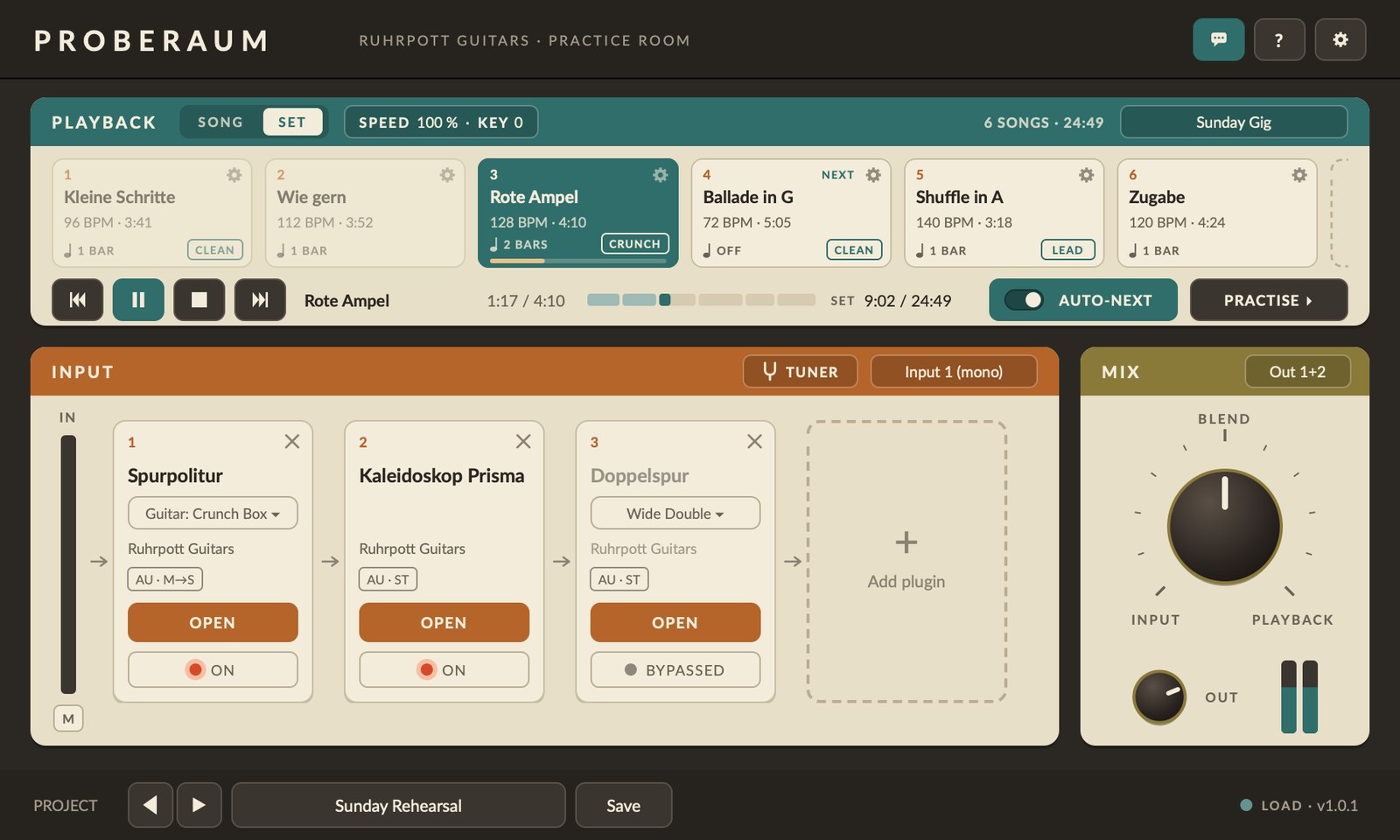
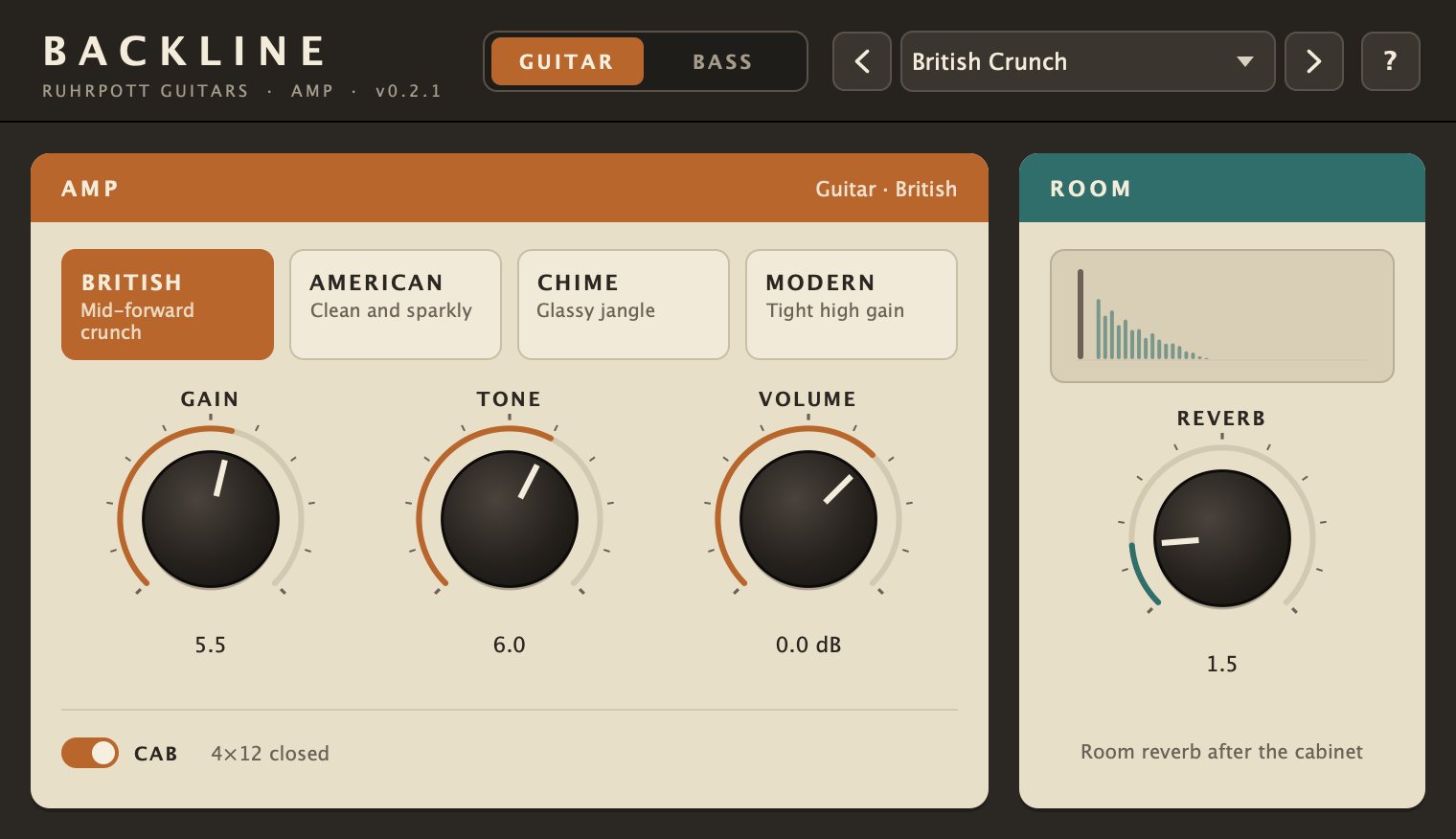
Your instrument runs from the audio interface through up to four plugins while a song plays back. The Blend knob mixes the two. Proberaum detects the tempo of the song, counts you in before you start and plays loops in whole bars – so you can practise tricky passages one by one. With sets you play a whole programme in order, song by song, each with its own sound. You can also practise songs slower, faster or in another key (SPEED & KEY), record yourself and listen back to the take right away; plus there’s a continuous click.
- Up to four plugins in a row, as Audio Unit or VST3 (Windows: VST3) – with favourites, recently used plugins and search; click the name to swap a plugin
- Built-in amp simulation Backline (under BUILT-IN): four guitar and three bass models, room reverb or compressor, zero latency
- Playback from WAV, AIFF, MP3, M4A, FLAC …, with tempo detection that follows the band’s tempo; loudness is matched so instrument and song sit well together
- Count-in that always lands on the one – even in the middle of a song
- SPEED & KEY: practise a song slower, faster or in another key – tempo 50–150 %, pitch ±12 semitones
- Recording: REC records one pass, then you listen back to your take right away – through your plugins and mixed with the song. Deliberately simple, not a looper. Export as WAV: the take only, take with playback, or dry (DI) for re-amping later
- Continuous click that follows the band’s tempo, even when they speed up or slow down
- Tuner (key T) that pauses the playback
- Loops in whole bars, zoom, control by keyboard or footswitch (key P for the count-in, C for the click)
- Sets: play a whole set in order – with count-in, pause and sound per song; the next song starts automatically
- Set time with time remaining and end time
- With PRACTISE you jump straight from the set to practising a song and back
- Page down / page up (e.g. a page-turner pedal) switches to the next or previous song
- Projects save your sound, with the playback if you like
- Proberaum helps when something goes wrong: after a crash it offers on the next launch to send Jan a report by email (you see the email first and send it yourself), otherwise via gear › Send problem report
MacProberaum is an app, not a plugin: drag it into your Applications folder and launch it. On first launch macOS asks for microphone access – that means the input of your interface. The installation guide is included in the download.
 WindowsRun the installer; Windows may warn you (SmartScreen: “More info” › “Run anyway”). For an audio interface, install the manufacturer’s driver and choose ASIO® under DRIVER in Proberaum’s gear › Audio settings.
For macOS 11 or later (Apple Silicon and Intel) and Windows 10/11 (64-bit).

Proberaum for Windows is ASIO® compatible. ASIO is a registered trademark of Steinberg Media Technologies GmbH.
Try free for 14 days macOS · 15.5 MB
Try free for 14 days Windows · 8.2 MB
The plugins
All plugins in a bundle

All plugins at once: Doppelspur + Überholspur, Ebb & Flow, Kaleidoskop + Prisma, Namenlos, Spurpolitur, Omnia. Doppelspur + Überholspur and Kaleidoskop + Prisma come as pairs only. Whatever you already bought separately counts in full.
For macOS 11 or later and Windows 10/11 (64-bit; plugins as AU and VST3, VST3 on Windows).
Try free for 14 days:
Proberaum: Mac · Windows
Plugins: Mac · Windows
Doppelspur + Überholspur
Artificial double tracking as at Abbey Road in 1966 – in mono and in true stereo

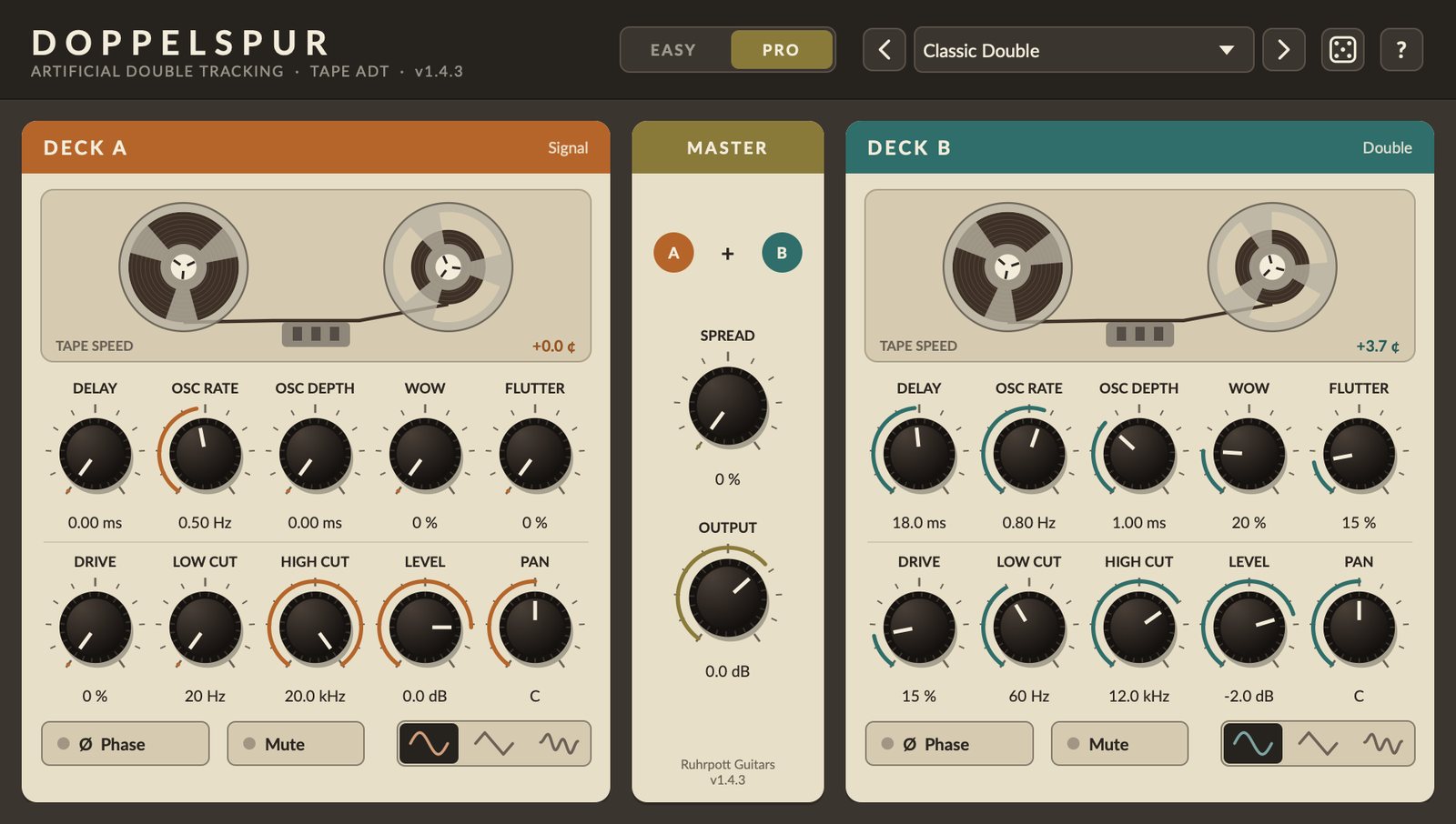
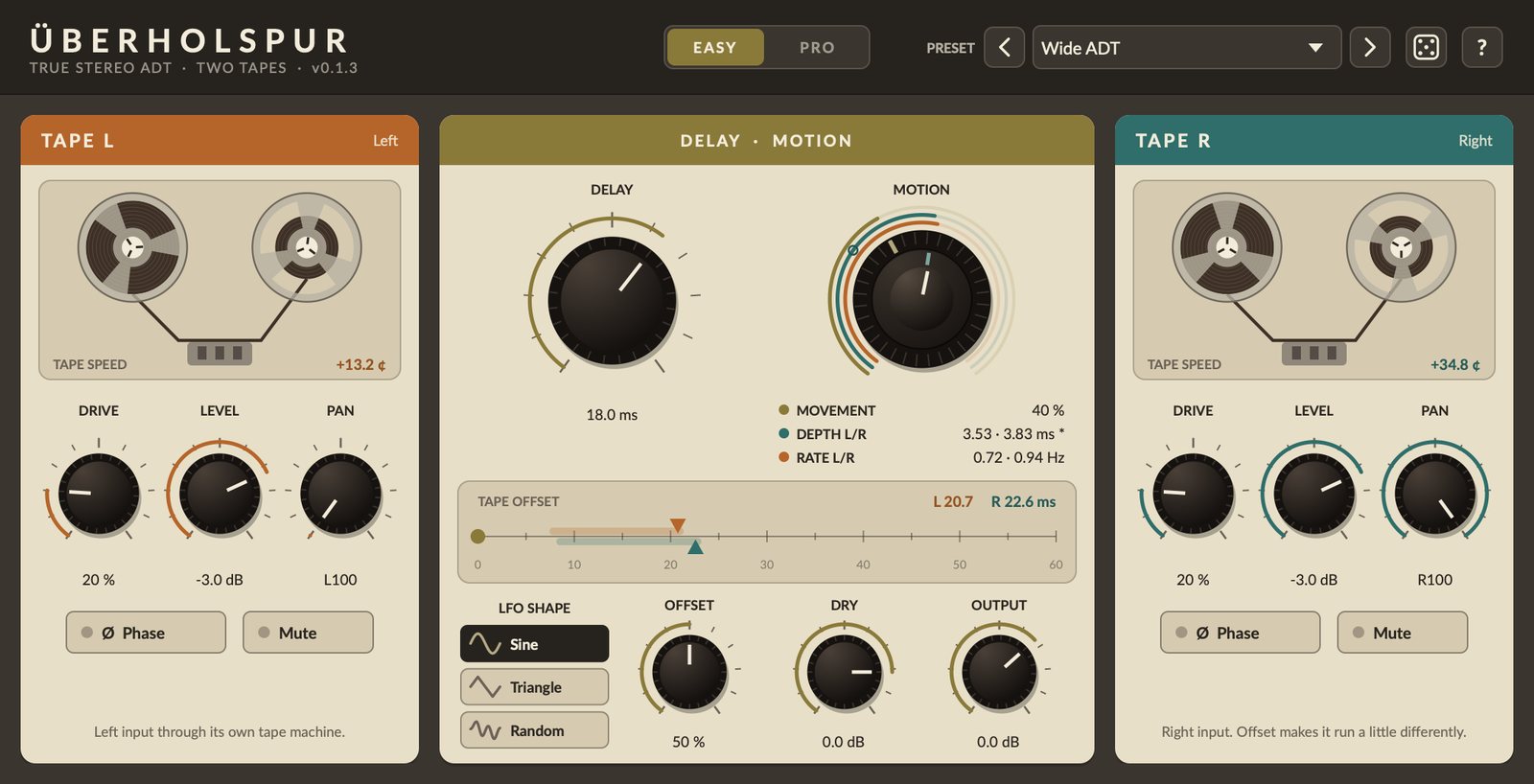
Doppelspur: the signal runs through a second, virtual tape machine whose speed is constantly nudged by an oscillator. The delayed, slightly wavering signal sounds like a second take: vocals and guitars get wider and fuller without sounding like an effect.
Überholspur: the stereo sibling. The left input runs through its own tape machine to the left, the right input through a second one to the right, the dry signal stays in the centre. Ideal for vocals: the voice stays in the centre while two doubles join it on the left and right. Works just as well on stereo guitars, keys and synths.
- Easy and Pro views sharing all settings; one Motion control for movement, depth and speed
- Tape saturation, wow & flutter, filters and panning per tape
- Überholspur: Tape L and Tape R with their own tape speed, Offset and a Dry control for the dry centre
- 14 factory presets each, user presets and a dice for random sounds
TipTwo plugins, two jobs. Doppelspur makes one double and can pull the original and the double apart to the left and right – great when a track should get wider. On mono tracks, load it as a stereo effect for that (in Logic “Mono › Stereo”). Überholspur keeps the track in the centre and adds two doubles you can place in the panorama – ideal for vocals. In your DAW’s plugin list it’s called “Ueberholspur”, without the umlaut.
For macOS 11 or later (Apple Silicon and Intel) and Windows 10/11 (64-bit, VST3).
Try free for 14 days macOS · 108.7 MB
Try free for 14 days Windows · 27.3 MB
Ebb & Flow
Random pitch jumps – from tape stop to chorus
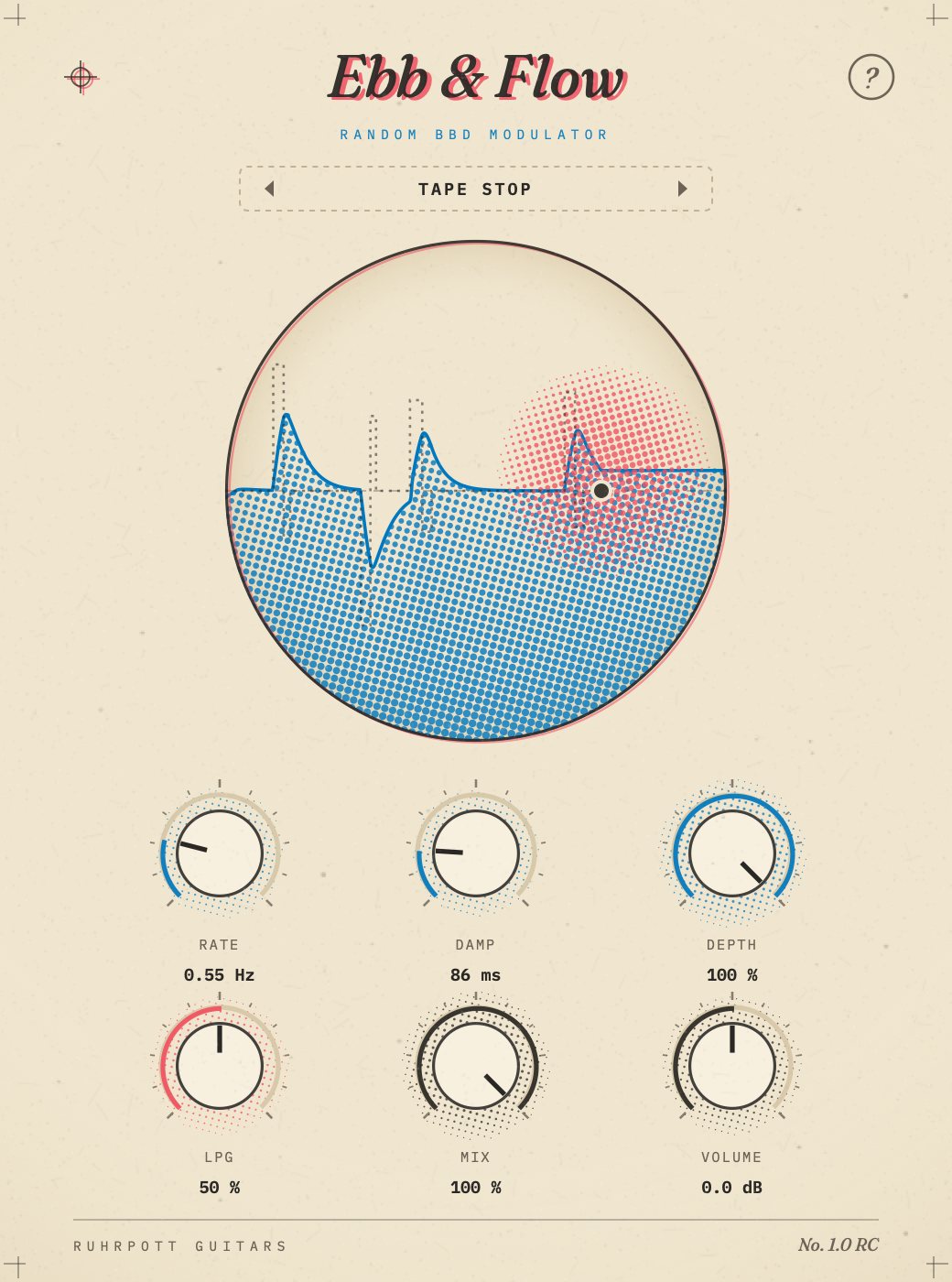
A modulation effect built around a bucket-brigade chip (BBD): a random LFO keeps pulling the delay away for a moment, up or down, and snaps right back. Set hard it sounds like a stuttering tape, set soft like a floating chorus. A low pass gate follows your playing and lets the sound breathe.
- Rate, Damp and Depth: how often, how smoothly and how far it jumps
- LPG from dark to open – loud notes open the gate further, plus a touch of noise
- Mix from dry to wet – with some dry signal it turns into a chorus
- 10 factory presets from “Tape Stop” to “Tidal Chorus”, user presets
TipStart with the “Tape Stop” preset. Turn Damp to the right and it becomes a chorus.
For macOS 11 or later (Apple Silicon and Intel) and Windows 10/11 (64-bit, VST3).
Try free for 14 days macOS · 108.7 MB
Try free for 14 days Windows · 27.3 MB
Kaleidoskop + Prisma
Random multi-effect with exactly one control – and its open sibling
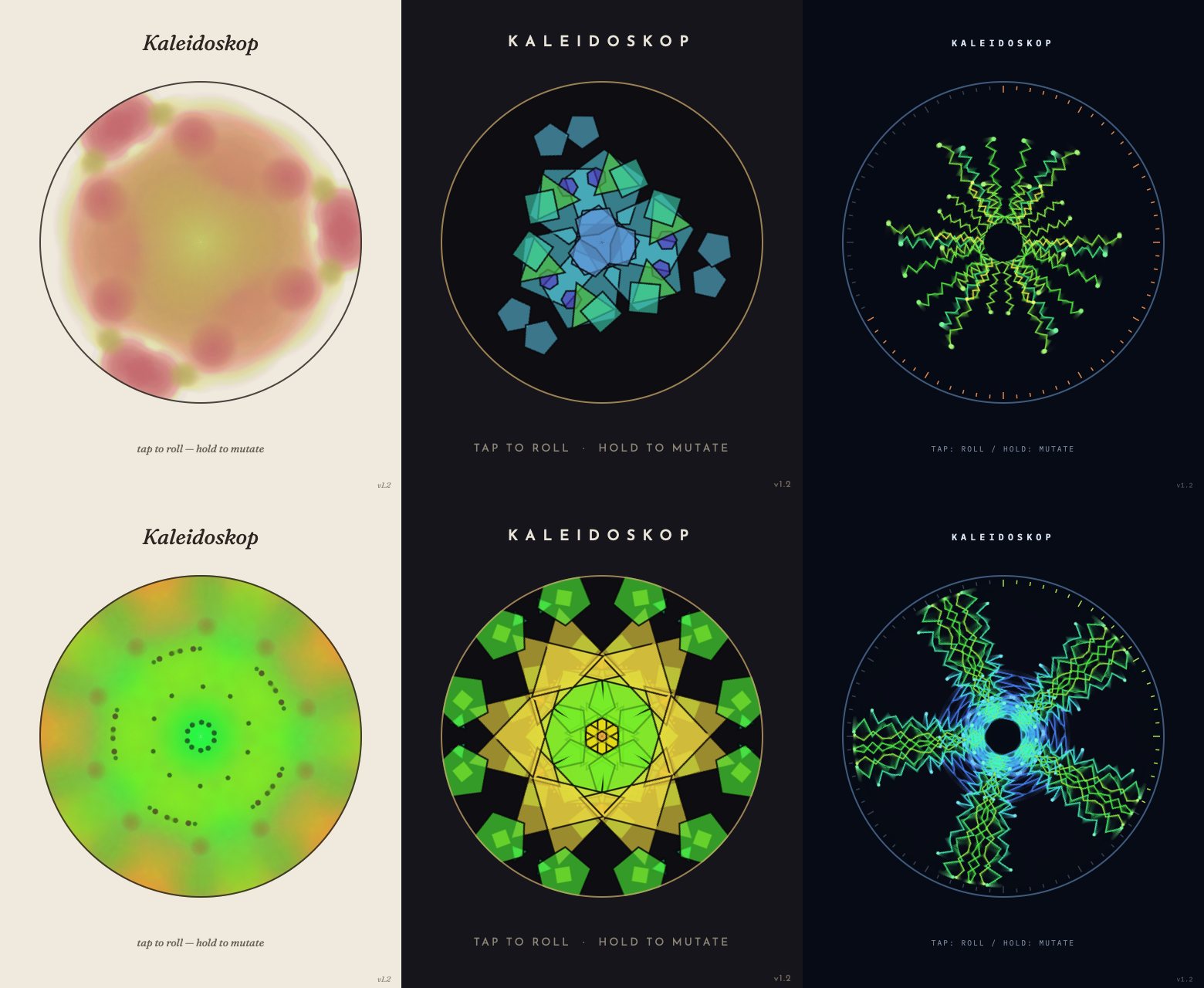
Kaleidoskop: a tap rolls a new effect chain, holding lets the sound drift, and your tapping rhythm decides how wild it gets – from gentle to “Carnage”. No knobs, no effect names: just listen and roll again.
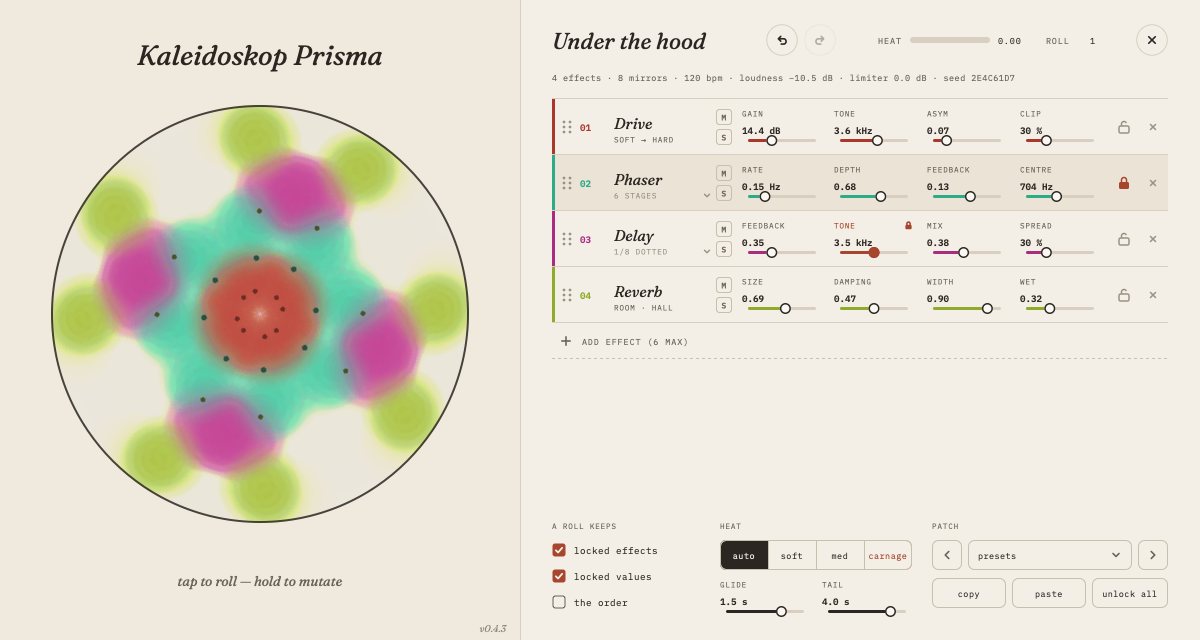
Kaleidoskop Prisma: the same sound and the same eye, but everything Kaleidoskop hides is out in the open – every chain, every effect and every value can be seen and adjusted.
- 16 effects, 3 to 6 in every chain; heat set by your tapping rhythm
- Three looks (Ink, Glass, Signal), loudness matching and a limiter as a safety net
- Prisma: choose the chain freely and reorder it by dragging, locks for effects and values
- Prisma: undo/redo, factory presets, mute and solo per effect
TipBoth plugins come as a pair only. In Prisma, right-click the eye to open and close the hood.
For macOS 11 or later (Apple Silicon and Intel) and Windows 10/11 (64-bit, VST3).
Try free for 14 days macOS · 108.7 MB
Try free for 14 days Windows · 27.3 MB
Namenlos
Flanger, chorus, doubling, tremolo – and everything in between
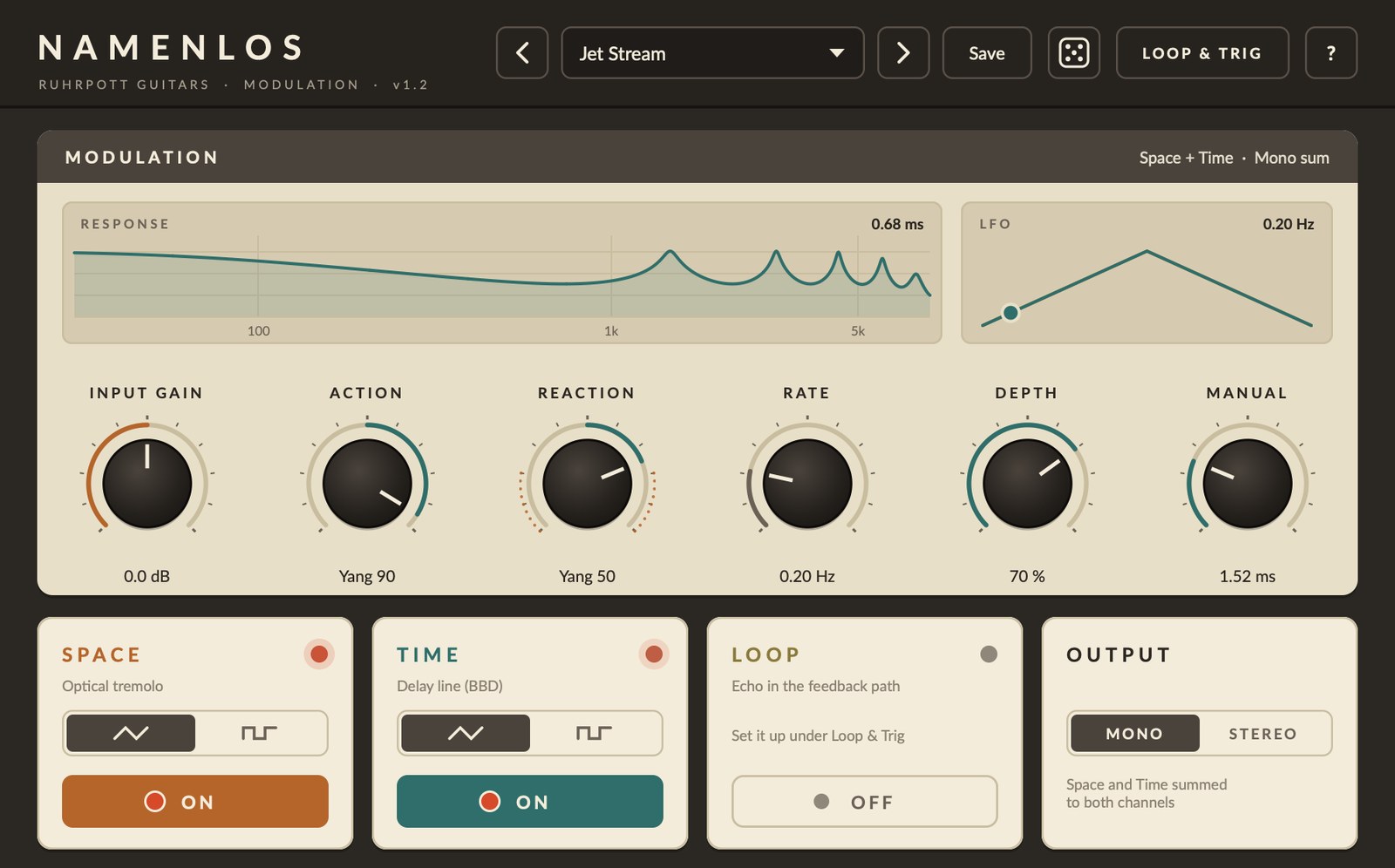
Modulation modelled on the Lovetone “Flange With No Name” (2000): a BBD delay with feedback plus an optical tremolo. From gentle phasing through chorus and doubling to slapback, all the way into self-oscillation if you want.
- Action and Reaction (Yin/Yang) for delay level and feedback
- Live display of frequency response and LFO
- Loop echo and Trig (LFO synced to the DAW) under “Loop & Trig”
- 16 factory presets, user presets, dice
TipTurn the volume down first, then experiment: self-oscillation can get a lot louder than the input signal.
For macOS 11 or later (Apple Silicon and Intel) and Windows 10/11 (64-bit, VST3).
Try free for 14 days macOS · 108.7 MB
Try free for 14 days Windows · 27.3 MB
Spurpolitur
Polish any track – seven effects, one knob each
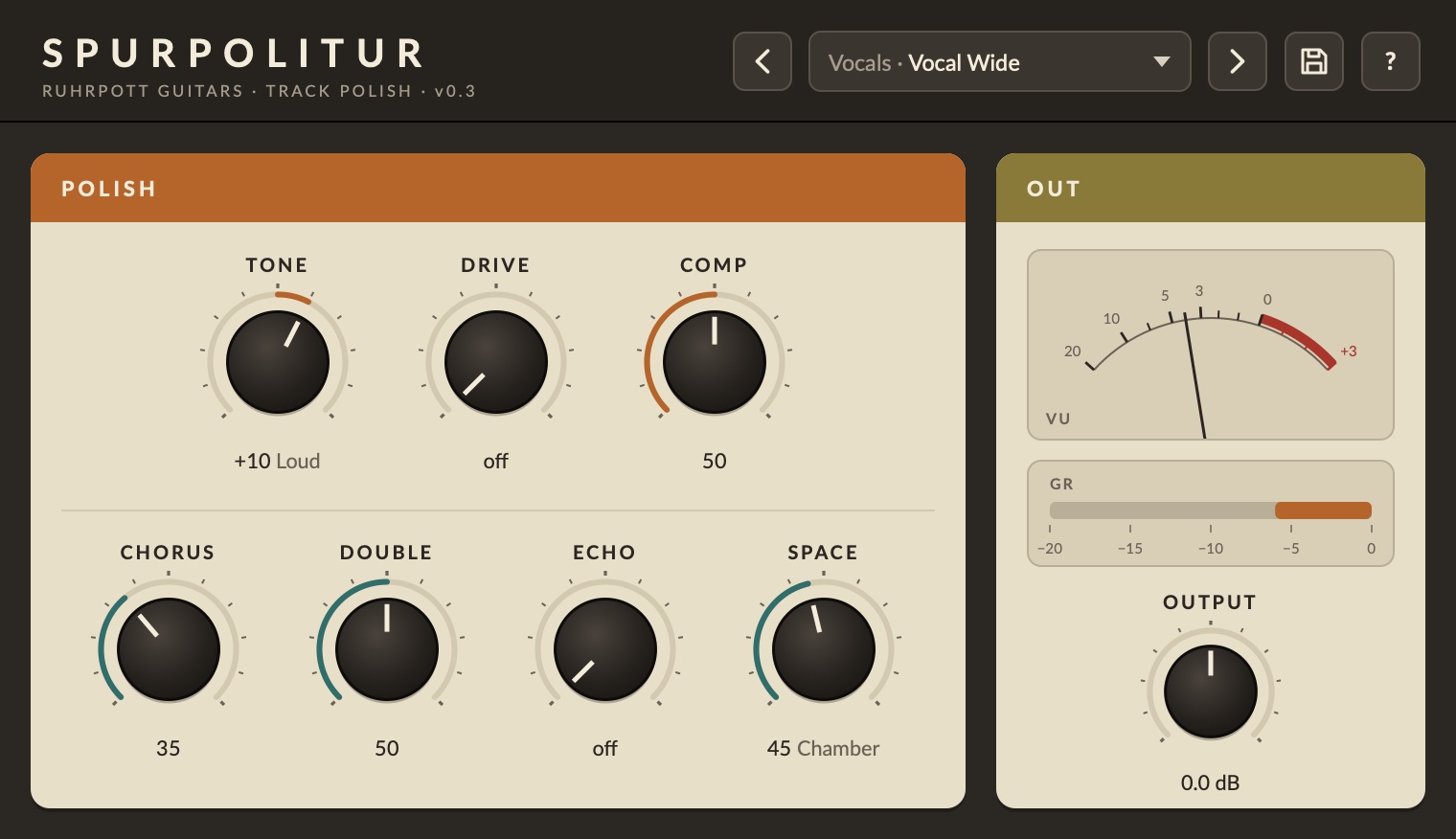
Tone (from lean and focused to loudness), Drive (from tape warmth to crunch), an opto compressor, chorus, tape doubling, tape echo and a reverb that moves with one knob from room through chamber and hall to plate. Plus a VU meter and a display for the compressor.
- Seven effects with one knob each – all at zero: signal unchanged
- SPACE: Room › Chamber › Hall › Plate, the character changes along the way
- VU meter for the output, bar for the compressor, values below the knobs
- 25 factory presets in five categories (Vocals, Guitar, Bass, Drums, Keys)
TipStart with a preset from the right category and then only adjust the knobs that stand out.
For macOS 11 or later (Apple Silicon and Intel) and Windows 10/11 (64-bit, VST3).
Try free for 14 days macOS · 108.7 MB
Try free for 14 days Windows · 27.3 MB
Omnia
String ensemble, synthesizer and bass in one
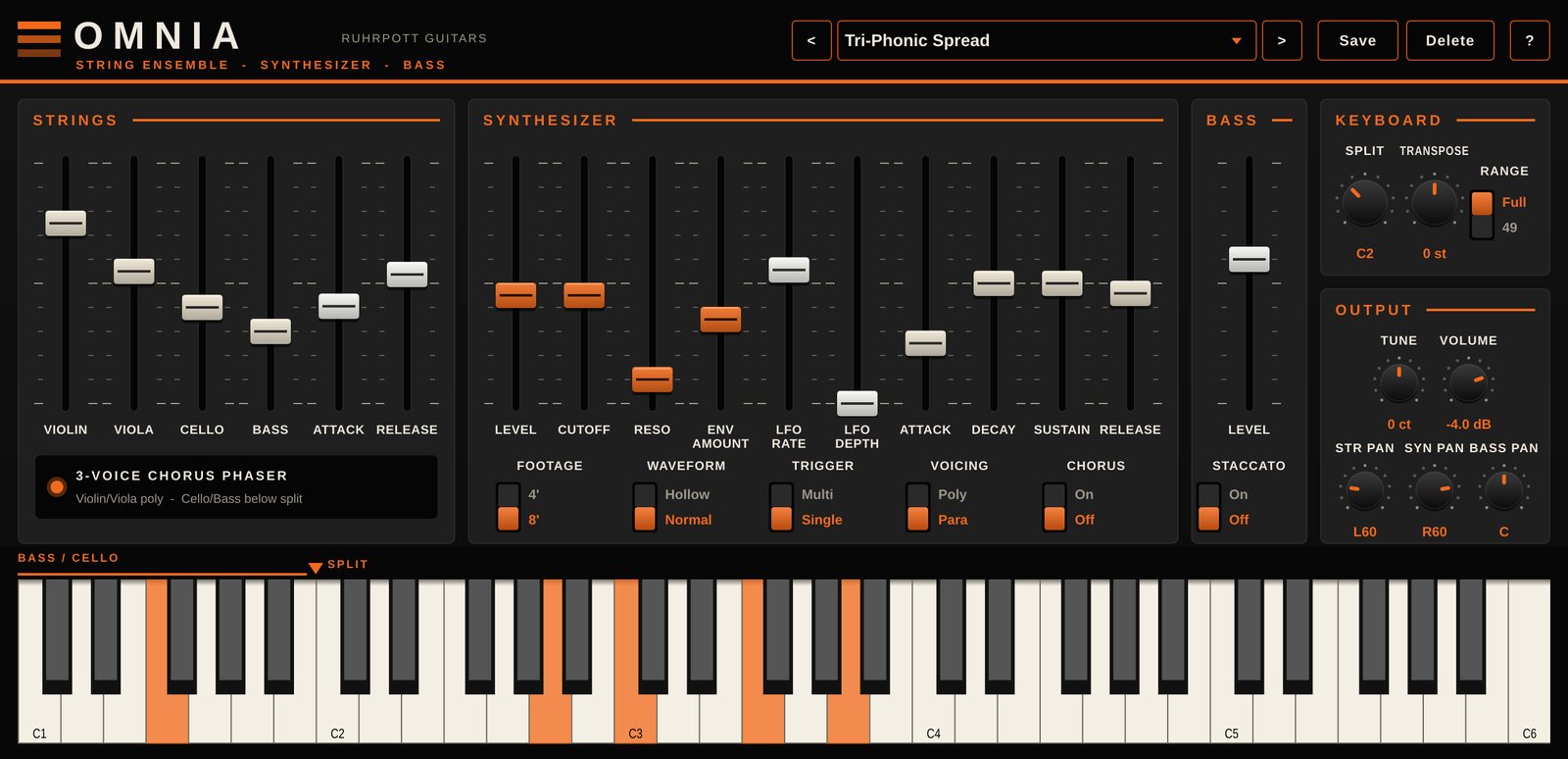
A virtual instrument modelled on a 1978 string machine: strings, a paraphonic or polyphonic synthesizer and a monophonic bass, all playable and mixable at the same time. Just like the original, every key comes from one shared tone generator – with that typical, floating ensemble sound.
- Strings (violin, viola, cello, bass) through the 3-voice chorus phaser
- Synthesizer paraphonic or polyphonic with 24 dB filter and ADSR
- Split, transpose and panning per section
- 16 factory presets, 6 of them in the spirit of Joy Division
TipOmnia is an instrument: load it into an instrument slot, not as an effect.
For macOS 11 or later (Apple Silicon and Intel) and Windows 10/11 (64-bit, VST3).
Try free for 14 days macOS · 108.7 MB
Try free for 14 days Windows · 27.3 MB
Try for free
Download everything and try it without limits for 14 days – no purchase, no sign-up. The plugins come in one installer; you choose which ones while installing.
Proberaum for Windows is ASIO® compatible. ASIO is a registered trademark of Steinberg Media Technologies GmbH.
News by email
New plugins, updates, little news from the workshop – rarely, no spam. Sign up, even without buying.